Installing
The downloads are on the release page, one
file per platform. The carol package is a separate download beside them. To build from source, see
BUILDING.md.
| Platform | What you get |
|---|---|
| Windows | A setup program, karaokemachine-setup-<version>-windows-x86_64.exe, with all nine products behind component checkboxes. It installs per-user into %LOCALAPPDATA%\Programs with no UAC prompt, and offers to add itself to PATH and to open .kmbuild files. Or a portable folder: unzip and run. |
| macOS | An installer package, karaokemachine-setup-<version>-macos-<arch>.pkg, with the same nine products. Applications go to /Applications, and command-line tools to /usr/local/karaokemachine with symlinks in /usr/local/bin. It asks for your administrator password once. Or Karaoke Machine.app on its own. |
| Windows or macOS, the remote alone | km-remote-setup-<version>-windows-x86_64.exe or km-remote-setup-<version>-macos-<arch>.pkg. It installs KM Remote only, for a computer that never plays a song. It can stay beside a full install. |
| Debian, Ubuntu | A .deb that names its ffmpeg and font dependencies. It installs a menu entry, an icon and the karaokemachine command, plus the appliance service, switched off. A second .deb, karaokemachine-tools, holds the two package builders, the offline remote and the picture-and-bank tool. Name both files in one apt install to get both. A Raspberry Pi takes the two _arm64.deb files, on Raspberry Pi OS based on Debian 13. They are not tested on a board. |
| Any Linux | A .tar.gz. Unpack it anywhere and run it, with no root and no package manager. It carries its own ffmpeg. A second one, karaokemachine-portable-<version>-linux-x86_64.tar.gz, is a portable copy: the machine and every tool, each keeping its settings and songs in the data folder inside. Both have an aarch64 file for 64-bit ARM. |
| Android, Google TV | An APK carrying both ABIs, for a phone and for a television. |
| Meta Quest | An APK of its own, which puts the machine on a screen hanging in the room with the room still behind it. The screen starts on your wall, and you move it and resize it by hand. The singer’s queue hangs beside it. A button switches to an ordinary system window and back, once the queue is empty. |
| iPhone, iPad | An .ipa for the machine and one for the remote, both unsigned. You sign them yourself with your own Apple ID. |
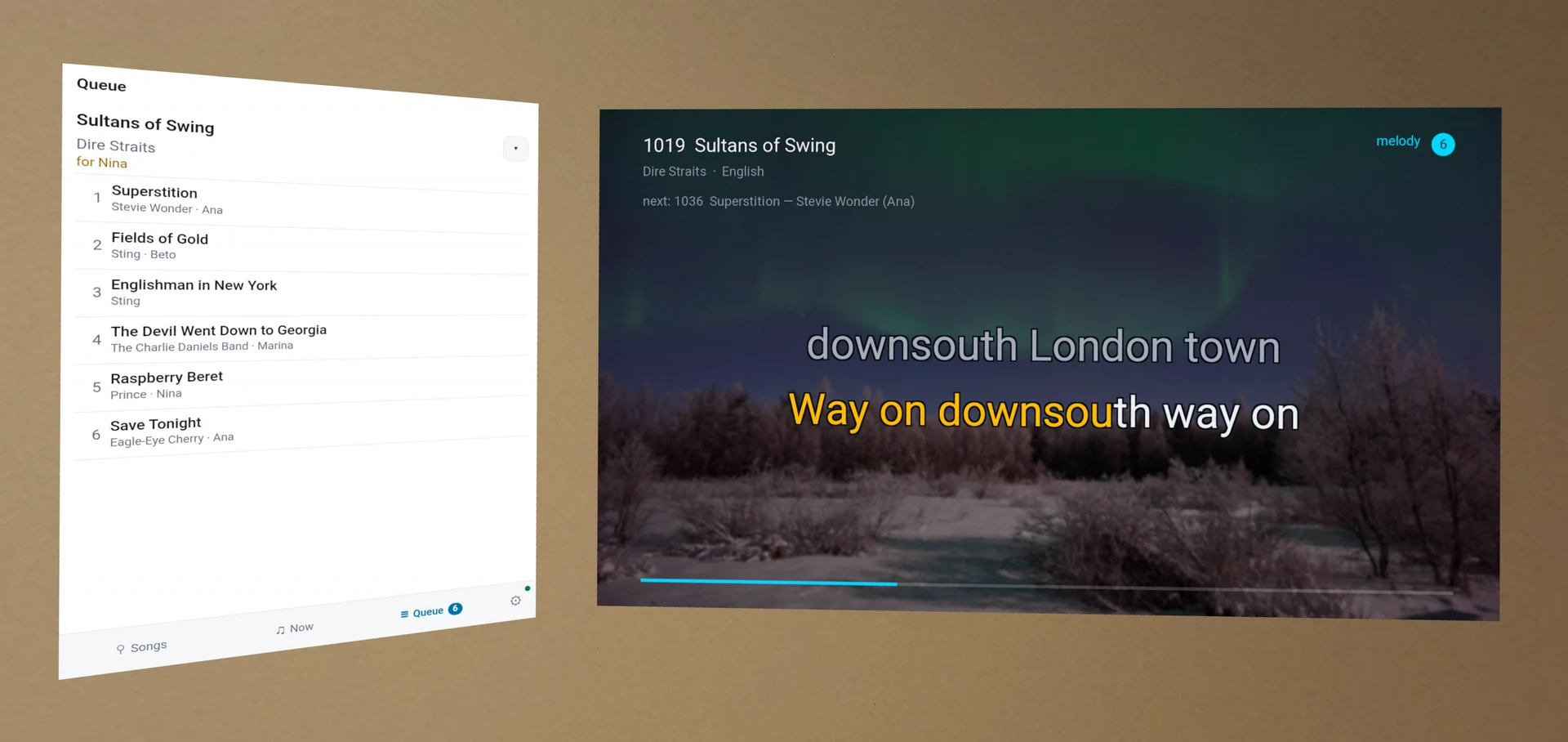
In a Meta Quest, the screen hangs on your wall and the queue hangs beside it.
Every install also has a second launcher, which starts the machine streaming. See Watching it in another room.
What each system asks
- Windows shows “Windows protected your PC” when you open a setup program, because the Windows downloads are not signed. Click More info, then Run anyway.
- macOS asks nothing. Both packages carry Apple’s signature and notarization, so a double-click opens Installer.
- Android asks you to allow installation from this source. The project’s own key signs both APKs, so each version installs over the one before it. A device that holds an APK signed with a different key must uninstall it first, and Android reports that as a refusal. Export the remote’s favorites from its share page before, and import them after.
- A Meta Quest lists the application under Unknown Sources and shows no name beside its icon.
That name comes from Meta’s store, and a sideloaded application has no entry there. Songs reach
the headset as they reach a phone: open a
.kmpkgfrom its Files application, or push one over a cable. - Debian and Ubuntu report that a
.debinstalled by path is unsigned. The tarballs are unsigned too. - An iPhone or an iPad installs no unsigned application. You sign both
.ipafiles yourself, and On an iPhone or an iPad has the steps.