Running a public night
A bar, a hall or a party of strangers runs on the same machine as a living room. Guests ask for songs from their own phones, and the owner sets the singers to take turns. A host corrects what the machine did.
The night needs no second program and no account. A guest installs nothing, and the machine forgets the singers when the host starts a new evening.
A venue’s machine can keep the night through a power cut. Turn on Keep the queue and the singers when the machine restarts, and a restart loses nothing. See After a power cut or a restart.
Set the machine up once
The owner sets eight things before the doors open. All eight are on the setup pages’ This machine tab, under Access and Singers and queue. See Setting it up from a browser.
| Setting | At a venue | Why |
|---|---|---|
| The admin password | Set one of your own, and keep it | The machine shows its first password on its own screen, where every guest reads it |
| Room level | Ask for songs | Each table asks from a phone. The default lets every phone skip |
| Queue order | Singers take turns | Each singer gets a turn. The default plays songs in the order asked, so one table could fill the queue |
| Code for the host’s tab | Set one, and give it to the host | It opens the host’s tab |
| Code to skip | Set none | The host’s code skips as well |
| Code to queue | Set none, or keep it | It adds a song out of turn, and it changes the key of any singer’s song |
| Every singer gives a name | On | The host calls each singer by the name on the screen |
| Songs one singer may have waiting | A low number, such as 2 | One table cannot fill the list of waiting songs |
| Keep the queue and the singers when the machine restarts | On | A power cut does not end the night |
Choose Watch only for the room where the host enters every song. Guests then read the queue on their phones and ask at the desk. The host adds each song on the host’s tab.
A host for one night needs the code for the host’s tab and nothing else. The admin password stays with the owner, because a host changes no setting.
Play a large collection from its own folder
A venue’s collection can stay in the folders it already has. A normal package holds a copy of every song file. For a collection of thousands of songs, that copy doubles the disk it takes. A linked package holds no song file. It names each file by its path, and the machine plays the file from where it is.
- Keep the collection in one folder on the machine’s disk, or on a drive the machine reaches.
- Build a linked package for each part of it. Each packaging tool has a box for this. See A package that holds no songs.
- Allow linked packages on the machine. Name the folder and tick the box, both on the Songs tab. See Linked packages.
- Install each package the way you install any other.
Guests see no difference. A linked package’s songs are searched, numbered and queued like any others.
Do not move or rename the song files after you build the package. A song whose file is missing does not play, and the machine goes to the next song in the queue. A package whose whole folder is missing does not install. The Problems tab names it, so check that tab before the doors open.
A new song in the folder needs a new build of its package. The machine plays only the files the package names.
What a guest does
- Open the remote. Point a phone’s camera at the QR code on the machine’s idle screen.
- Type a name in Singing as on the Setup tab.
- Tap + on a song. Ask for as many as the machine allows.
- Read the Queue tab. Your songs says of each song whether it waits, is in the queue, or plays now. A song leaves the list when it ends. A song in the queue shows about how long until it starts. Below the queue, Waiting for a turn lists every singer’s waiting songs. Tap it to open the list.
With turns on, the machine keeps one song for each singer in the queue. A second song waits until the first one starts, and then it goes to the end of the queue. So a table that asks for five songs sings one, and then waits for every other singer’s turn.
No guest’s phone changes another singer’s song. At this room level a phone cannot change the key, the tempo or the volume, and it cannot skip.
What the room sees
The machine names each singer before the song. For five seconds the whole screen shows the title, the artist and the singer’s name. Demo songs are not announced.
While a song plays, the line under its title names the next song and its singer. The singer’s name is blue, so the next singer finds it from across the room.
The queue on the machine’s screen shows a wait beside each song. Press Q or F6 on the
machine to show it, and the room sees who is near. Its top line also counts the songs that wait for
a turn. See The keyboard.
What the host does
The host types the code for the host’s tab on the remote’s Setup tab. Tap Enter a code, type it, and tap Use. The remote then shows the host’s tab, which is the ticked box in the tab bar. The controls stand at the top, and two tabs below them hold the queue and the singers.
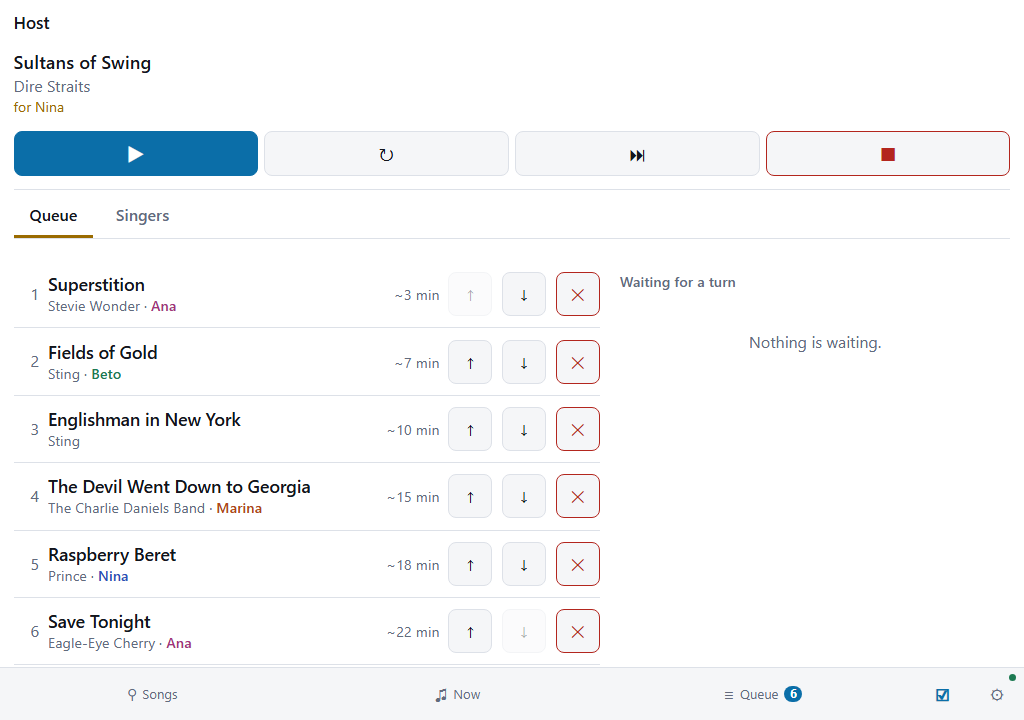
The host corrects, and the machine does the rest. The host adds a song for a guest with no phone, puts a waiting song in early, and refuses one. The host also moves a singer to another phone, joins two names that are one person, and removes a singer who went home. The remotes lists each action and its button.
Each singer’s name has a colour of its own on every phone. The host finds one singer’s songs in the queue at a glance. On the Songs tab, 👤 on a song takes it to the host’s tab, ready to add for a singer.
The night runs with nobody at the desk. A host who steps away loses only those corrections, and the singers still take turns.
Near the end, tap Stop taking requests. Phones then read that the night is closed. The songs that wait still play, and the host still adds one.
For the next night, open Start a new evening and tap Empty everything. That empties the queue, the waiting songs and the singers. The machine does not restart.
After a power cut or a restart
With the setting on, the machine starts with the night it had. The queue, the singers and the waiting songs are all there. Each guest’s phone still holds its singer, so nobody types a name again. The song that was playing is first in the queue, and it starts from its beginning.
The machine plays nothing until somebody chooses. Its screen says that an earlier evening is here, and how many songs and singers it holds. The host’s tab says the same at its top. A guest can still ask for a song, and that song waits with the others.
| To | At the machine | On the host’s tab |
|---|---|---|
| Go on with the night | Press Space or F1 | Tap Continue this evening |
| Clear a list from another day | Press N or F4, and press it again when the screen asks | Tap Start a new evening |
The machine keeps a list until somebody clears it. It does not clear a list because the list is old. So the host of the next day clears it before the doors open.
The machine loses one second of the night at most. It also keeps a copy from about a minute before. If a power cut damages the newest list, the machine starts with that copy.
With the setting off, every start is an empty machine. That suits a home.
Two limits of the network
Every phone must reach the machine over the venue’s network. Some guest networks keep each phone apart from every other device. Such a network also keeps the phones from the machine, so turn that setting off, or use another network.
Anybody on that network can ask for a song. No code raises one phone to asking alone. A venue that wants only its own guests to ask keeps strangers off the network, or sets the room to Watch only.
What the machine leaves to the venue
The machine knows nothing about the right to perform a song in public. A venue arranges that itself, as it does for any other music it plays.
The machine does not rate a singer, and it keeps no record of who sang after a new evening starts. A new evening also removes the list that the machine kept for a restart.